1- Open command prompt (Start->Run->cmd)
2- Enter the following command, then press ENTER
3- Enter the followin command, then press ENTER:compmgmt.mscThis should open the computer management console.
4- Go to local users & groups->users. Right click on any user and select "set password".
If you get a "access denied" do the following:start>run>cmdthen use following commands :
1) net user test /add (this command will make test named user)
2) net localgroup administrators test /add (this command will make test user as administrators rights)and use net user command to reset your admin. password
ANOTHER ALTERNATIVE :
What if u don't know the password of your admin and still want to change ??..
Yes u can do it in a very easy manner. Just follow the steps..
1. Start >> Run >> [type]cmd // this will open your command prompt
2. [type] net(space)user(press enter)
3. [type] net(space)user(space)[windowsloginid](space)*(press enter) // for e.g. : net user HOME *(press enter)
4. [type] new password (press enter) and retype it (press enter).. it will show u confirmation...
// caution it wont show u the password you type.. but it still types.. the blinking pointer will b there at the same place.. but it still works..// for e.g. : password changed successfully.
Thursday, December 20, 2007
HOW TO RECOVER WINDOWS XP LOGIN PASSWORD

HOW TO LOCK YOUR FOLDER WITHOUT INSTALLING ANY APPLICATION
LOCK FOLDER
1- Suppose you want to lock the folder movies in D: which has the path D:\movies.In the same drive create a text file and type ren movies
2- movies.{21EC2020-3AEA-1069-A2DD-08002B30309D} Now save this text file as loc.bat
3- Create another text file and type in it movies.{21EC2020-3AEA-1069-A2DD-08002B30309D} movies Now save this text file as key.bat2 batch files loc and key.
4- Press loc and the folder games will change to control panel and you cannot view its contents. Press key and you will get back your original folder.
Thursday, December 13, 2007
Bluetooth
Bluetooth is an industrial specification for wireless personal area networks (PANs). Bluetooth provides a way to connect and exchange information between devices such as mobile phones, laptops, PCs, printers, digital cameras, and video game consoles over a secure, globally unlicensed short-range radio frequency. The Bluetooth specifications are developed and licensed by the Bluetooth Special Interest Group.
Bluetooth is a standard and communications protocol primarily designed for low power consumption, with a short range (power-class-dependent: 1 meter, 10 meters, 100 meters) based on low-cost transceiver microchips in each device.
List of applications
More prevalent applications of Bluetooth include:
* Wireless control of and communication between a mobile phone and a hands-free headsetor car kit. This was one of the earliest applications to become popular.
* Wireless networking between PCs in a confined space and where little bandwidth is required.
* Wireless communications with PC input and output devices, the most common being the mouse, keyboard and printer.
* Transfer of files between devices with OBEX.
* Transfer of contact details, calendar appointments, and reminders between devices with OBEX.
* Replacement of traditional wired serial communications in test equipment, GPS receivers,
medical equipment, bar code scanners, and traffic control devices.
* For controls where infrared was traditionally used.
* Sending small advertisements from Bluetooth enabled advertising hoardings to other,discoverable, Bluetooth devices.
* Seventh-generation game consoles—Nintendo Wii, Sony PlayStation 3—use Bluetooth for their respective wireless controllers.
* Dial-up internet access on personal computer or PDA using a data-capable mobile phone as a modem.
* Receiving commercial advertisements ("spam") via a kiosk, e.g. at a movie theatre or lobby

Spectrum
Bluetooth technology operates in the unlicensed industrial, scientific and medical (ISM) band at 2.4 to 2.485 GHz, using a spread spectrum, frequency hopping, full-duplex signal at a nominal rate of 1600 hops/sec. The 2.4 GHz ISM band is available and unlicensed in most countries.
Interference
Bluetooth technology’s adaptive frequency hopping (AFH) capability was designed to reduce interference between wireless technologies sharing the 2.4 GHz spectrum. AFH works within the spectrum to take advantage of the available frequency. This is done by detecting other devices in the spectrum and avoiding the frequencies they are using. This adaptive hopping allows for more efficient transmission within the spectrum, providing users with greater performance even if using other technologies along with Bluetooth technology. The signal hops among 79 frequencies at 1 MHz intervals to give a high degree of interference immunity.
Power
The most commonly used radio is Class 2 and uses 2.5 mW of power. Bluetooth technology is designed to have very low power consumption. This is reinforced in the specification by allowing radios to be powered down when inactive.
Data Rate
1 Mbps for Version 1.2; Up to 3 Mbps supported for Version 2.0 + EDR
Being an IEEE standard will be a big plus to widespread adoption of Bluetooth, and IEEE 802.15 working group for personal area networks (PAN) announced that they will be adopting Bluetooth as the IEEE 802.15 standard.
Saturday, December 8, 2007
LATEST FROM HERO HONDA : HUNK
 Hero Honda recently launched its new 150 cc motorcycle called “Hunk” .
Its armoured heavy, it even looks heavier than the Karizma, the engine is not seen that much and is packed up really nice, the sports bike look goes in completely well.
From the engine aspect the HUNK is similar to that of the Xtreme's. The engine displacement is 149.2cc and produces 14.2 bhp @ 8500rpm with a max torque of 12.8Nm @ 6500rpm. This one also comes with first in HH gas charged and adjustable rear shocks. Seriously, the bike is definitely like an Ambition with Apache RTR160's look. The new fuel tank is accompanied by the big plastic extensions with the HUNK signed on it. The turn indicators are well placed and have no chances of bouncing when you hit a pothole. The extension of plastic mudguard below the lights are signs of sportiness and the black and dark color combo which is found in almost all the bikes are signs of sportiness as well as pictures of beast. Technical Specification
Engine : Air Cooled, 4 - Stroke Single Cylinder OHC
Displacement : 149.2 cc
Max Power : 10.6 Kw (14.4 Ps ) @ 8500 rpm
Torque : 12.80 N-m @ 6500 rpm
Bore x Stoke : 57.3 X 57.8 mm
Carburettor : C. V Type
Ignition : AMI - Advanced Microprocessor Ignition System
Gear Box : 5 Speed Constant Mesh
Type : Tubular, Diamond Type
Suspension :
Front- Telescopic Hydraulic Shock Absorbers
Rear- Rectangular Swing Arm with 5 Step Adjustable Gas Reservoir Suspension - GRS
Brakes :
Front- Disc: 240 mm Dia Disc - Non Asbestos Type
Rear- Drum: Internal Expanding Shoe Type (130 mm), Non Asbestos Type.
Rim Size :
Front- 18 X 1.85, Alloy Wheel
Rear - 18 X 2.15, Alloy Wheel
Tyre Size:
Front- 2.75 X 18 42P
Rear-100/90 X 18 - 56P (With Tuff-up Tube)
Battery : 12V -7 Ah
Head Light : 12V - 35 / 35 W = Halogen Bulb (Mulit Reflector Type)
Tail Lamp : 12 V - 5W
Stop Lamp : 12V - 21W
Turn Signal Lamp : 12 V - 10W x 4 nos, Clear Lense, Multi reflector Type.
Fuel Tank Capacity : 12.4 Ltrs
Reserve- 2.2 Ltrs (Usable Reserve)
Length : 2080 mm
Width : 765 mm'
Height : 1095 mm
Wheel Base: 1325 mm
Saddle Height : 795 mm
Ground Clearance : 145 mm
Kerb Weight : 143 Kg (Kick) / 145 Kg (self)
Pricing:
The Hunk has been priced at Rs. 55,000 (ex showroom New Delhi) for the kick start model and at around Rs. 57,000 (ex showroom New Delhi) for the self start model.
Friday, December 7, 2007
TOYOTA COROLLA

| |||||||||||||||||||||||||||||||||||||||||||||||||||||||||||||||||


 When you seek something higher than the ordinary, step into the Toyota Corolla. You will discover a motoring experience that surpasses your experiences.Engineered to precision, styled with flamboyance and driven by excellence, you'll find the all-new Corolla lead by large margin. On the road in your mind. An ideal extension of your escalating self, it is truly the one above. | ||||||||||||||||||||||||||||||||||||||||||||||||||||||||||||
HOW TO HAVE AN ICON IN WINDOWS WITH NO NAME
Normally you have to have a name for an icon, just spaces are not allowed.
To create an icon with no name attached:
Make sure Num Lock is on
Highlight the Icon you want to change
Right-Mouse click and select Rename
While holding down the Alt key, type 0160
Now the icon will have no name below it.
Thursday, December 6, 2007
3G
3G is the third generation of mobile phone standards and technology, after 2G. It is based on the International Telecommunication Union (ITU) family of standards under the International Mobile Telecommunications programme, "IMT-2000". 3G technologies enable network operators to offer users a wider range of more advanced services while achieving greater network capacity through improved spectral efficiency. Services include wide-area wireless voice telephony and broadband wireless data, all in a mobile environment. Typically, they provide service at 5-10 Mb per second.
Unlike IEEE 802.11 networks, 3G networks are wide area cellular telephone networks which evolved to incorporate high-speed internet access and video telephony. IEEE 802.11 (common home Wi-Fi) networks are short range, high-bandwidth networks primarily developed for data.

Features
The most significant feature of 3G mobile technology is that it supports greater numbers of voice and data customers — especially in urban areas — and higher data rates at lower incremental cost than 2G.
By using the radio spectrum in bands identified, which is provided by the UTI for Third Generation IMT-2000 mobile services, it subsequently licensed to operators. 3G uses .6 MHz channel carrier width to deliver significantly higher data rates and increased capacity compared to 2G networks.

The .5 MHz channel carrier provides optimum use of radio resources for operators who have been granted large, contiguous blocks of spectrum. On the other hand, it also helps to reduce the cost to 3G networks while being capable of providing extremely high-speed data transmission to users.
It also allows the transmission of 384 kbit/s for mobile systems and 2 Mb/s for stationary systems. 3G users are expected to have greater capacity and better spectrum efficiency, which allows them to access global roaming between different 3G networks.
Mobile technologies
When converting a GSM network to a UMTS network, the first new technology is General Packet Radio Service (GPRS). It is the trigger to 3G services. The network connection is always on, so the subscriber is online all the time. From the operator's point of view, it is important that GPRS investments are re-used when going to UMTS. Also capitalizing on GPRS business experience is very important.
From GPRS, operators could change the network directly to UMTS, or invest in an EDGE system. One advantage of EDGE over UMTS is that it requires no new licenses. The frequencies are also re-used and no new antennas are needed.

3G isn’t just about faster speeds. It’s about compelling multimedia experiences that are available now—and ones that we might not have thought of yet. The technology behind 3G makes cellular networks more efficient and powerful, opening up a world of new possibilities.
Wednesday, December 5, 2007
GOOGLE TALK : SOME HANDY TIPS


With Google Talk being all the craze right now, some people hating it, and others loving it, I figured that I would post a list of tips and tricks for those curious about the extra "features" Google implemented and has not said much about.
Registry Tweaks
You can edit most settings by opening regedit (start -> regedit),
and navigating to the key HKEY_CURRENT_USER\Software\Google\Google Talk.
The "Google/Google Talk" key has several sub-keys that hold different option values:
Accounts: This one has subkeys for each different account that has logged in on the client. These keys have different values that store the username, password and connection options.
Autoupdate: Stores the current version information. When the client checks for updates it compares Google's response with these values. If an update is needed, it will download and update the new version.
Options: This is the most interesting part, where most of the current hacks should be used (keep reading).
Process: Stores the process ID. Probably used by Google Talk to detect if it's already running or not.
1.) HKEY_CURRENT_USER\Software\Google\Google Talk\Options\show_pin
If 1, shows a "pin" next to the minimize button that keeps the windows on top of all the other open windows when clicked.
2.) HKEY_CURRENT_USER\Software\Google\Google Talk\Options\view_show_taskbutton
If 0, hides the taskbar button, and leaves the tray icon only, when the window is shown
3.) HKEY_CURRENT_USER\Software\Google\Google Talk\Options\away_inactive
If 1, status will be set as Away after the specified number of minutes.
4.)HKEY_CURRENT_USER\Software\Google\Google Talk\Options\away_screensaver
If 1, status will be set as Away after the specified number of minutes.
5.)HKEY_CURRENT_USER\Software\Google\Google Talk\Options\inactive_minutes
Number of inactive minutes to become away if auto-away is on.
More Tips & Tricks
Change the font size - While holding the control key, move the scroll wheel on your mouse either up or down. This trick works while being focused in either the read or write area.
Insert line breaks - If you want to have a message that spans multiple paragraphs, just hold shift and hit enter. You can add as many new lines as you want to create.
Bold Text - To write something bold, you can use an asterisk before and after the word, like *this* .
Italic Text - To use italics, use an underscore before an after the word, like _this_ .
Switch windows - Hitting tab will cycle through open windows. It will select minimized conversations, to expand them just hit enter. If you just want to cycle through IM's and don't care about the buddy list, control-tab will do that and will automatically expand a minimized conversation if you settle on one.
Invitation Tips - You don’t need to say Yes or No when someone wants to add you as a friend; you can simply ignore it, the request will go away. (On the other hand, someone with whom you chat often will automatically turn to be your friend, unless you disable this in the options).
Show Hyperlinks - You can show your homepage or blog URL simply by entering the it in your away message (at the top of the main window). It will automatically turn to a link visible to others.
A message can be 32767 characters long.
What you need to do to have conference calls: Open up a copy of Google Talk on all computers with which you wish to conference. After one copy is opened make a new shortcut for Google Talk but at the end of it add /nomutex. If you installed it to the default folder then your shortcut should read "C:\Program Files\Google\Google Talk\googletalk.exe" /nomutex. Open 2nd instances of the software on every user's computer. After this start a chain: User 1 should connect on one instance to user 2. User 2 will connect on his second instance to user 3. User 3 will connect using his second instance back to user 1. With this chain everyone is connected to everyone.How To
Conference Calls :
Nickname & Status Message :
Contacts :
You don't need to say Yes or No when someone wants to add you as a friend; you can simply ignore it, the request will go away. (On the other hand, someone with whom you chat often will automatically turn to be your friend, unless you disable this).
NB: The Gmail account 'user@gmail.com' can't be invited as your friend.
It's possible to broadcast music, MP3, etc.. through Google Talk.Play Music :
Unplug your microphone. Double click on the speaker icon in the lower right corner. This will open up "Volume Control". Select "Options" and then "Properties". Then check the button next to "Recording" then click OK. You may also have to change your setting under Mixer Device. Now the Recording Control screen should be up. On my computer I selected "Wave Out Mix". Click on the green phone in Google Talk and call your friend.
Ctrl + E - It centralizes the selected text, or the current line.Keyboard Shortcuts
Ctrl + R - It justifies to the right the selected text, or the current line.
Ctrl + L - It justifies to the left the selected text, or the current line.
Ctrl + I - The same thing does that Tab.
Tab - It is giving the area to each of the windows opened by Google Talk.
Ctrl + Tab - The same thing does that Shift + Tab .
Shift + Tab - The same thing does that Tab but in reverse.
Ctrl + Shift + L -Switch between points, numbers, letters, capital letters, roman numbers and capital roman numbers
Ctrl + 1 (KeyPad) - It does a simple space between the lines.
Ctrl + 2 (KeyPad) - It does a double space between the lines.
Ctrl + 5 (KeyPad) - A space does 1.5 between the lines.
Ctrl + 1 (NumPad) - It goes at the end of the last line.
Ctrl + 7 (NumPad) - It goes at the begin of the last line.
Ctrl + F4 - It closes the current window.
Alt + F4 - It closes the current window.
Alt + Esc - It Minimize all the windows.
Windows + ESC - Open Google Talk (if it's minimized, or in the tray)
F9 - Open Gmail to send an email to the current contact.
F11 - It initiates a telephonic call with your friend.
F12 - It cancels a telephonic call.
Esc - It closes the current window.
[HOW TO] Use multiple identities on Google Talk
Want to run Google Talk with multiple Gmail identities? If you have several Google Gmail accounts you also may want to run multiple instances of Google Talk This is especially important for families that share a single PC. Nothing worse than a family member signing you out so they can sign in under their own account!
Basically, to have "Google Polygamy" you need to run Google Talk with the following switch: /nomutex
Step 1: Right-click on the desktop
Step 2: Select New
Step 3: Select Shortcut
Step 4: Paste this into the text box:
"c:\program files\google\google talk\googletalk.exe" /nomutex
Step 5: Click Next and choose a shortcut name such as Google Talk1, Google Talk2, or something related to your Gmail account for easy remembering which account is which.
Step 6: Click OK a few times.
[HOW TO] Use Google Talk via a Web Browser
You want to use Google Talk anywhere ? Follow these guidelines :)
Step 1: Opens your favorite web browser at the following address :
http://www.webjabber.net:8080/jim/
Step 2: Follow the instructions of the Page.
Step 3: You can talk with your friends
Google's Secret Command-Line Parameters
There are a few secret parameters you can add to Google Talk and make it function differently.
The most important, I think, is /nomutex, which allows you to run more than one instance of GT. Here are the others:
/nomutex: allows you to open more than one instance of Google Talk
/autostart: when Google Talk is run with this parameter, it will check the registry settings to see if it needs to be started or not. If the "Start automatically with Windows" option is unchecked, it won't start.
/forcestart: same as /autostart, but forces it to start no matter what option was set.
/S upgrade: Used when upgrading Google Talk
/register: registers Google Talk in the registry, includig the GMail Compose method.
/checkupdate: check for newer versions
/plaintextauth: uses plain authentication mechanism instead then Google's GAIA mechanism. Used for testing the plain method on Google's servers.
/nogaiaauth: disables GAIA authentication method. The same as above.
/factoryreset: set settings back to default.
/gaiaserver servername.com: uses a different GAIA server to connect to Google Talk. Used for debug purposes only, there are no other known GAIA servers.
/mailto email@host.com: send an email with Gmail
/diag: start Google Talk in diagnostic mode
/log: probably has something to do with the diagnostic logging
/unregister: ?
/embedding: ?
To add these, open up your GT shortcut, and where it says "Target:" add one or more of these inside the quotations, but after the .exe part.
Command Line stuff
There are a few secret parameters you can add to Google Talk and make it function differently. The most important, I think, is /nomutex, which allows you to run more than one instance of GT. He Talk is run with this parameter, it will check the registry settings to see if it needs to be started or not. If the "Start automatically with Windows" option is unchecked, it won't start.
/forcestart: same as /autostart, but forces it to start no matter what option was set.
/S upgrade: Used when upgrading Google Talk
/register: registers Google Talk in the registry, includig the GMail Compose method.
/checkupdate: check for newer versions
/plaintextauth: uses plain authentication mechanism instead then Google's GAIA mechanism. Used for testing the plain method on Google's servers.
/nogaiaauth: disables GAIA authentication method. The same as above.
/factoryreset: set settings back to default.
/gaiaserver servername.com: uses a different GAIA server to connect to Google Talk. Used for debug purposes only, there are no other known GAIA servers.
/mailto email@host.com: send an email with Gmail
/diag: start Google Talk in diagnostic mode
/log: probably has something to do with the diagnostic logging
/unregister: ?
/embedding: ? To add these, open up your GT shortcut, and where it says "Target:" add one or more of these inside the quotations, but after the .exe part. ere are the others:
/autostart: when Google
Emotions :
All these emotions appears in color in a conversation : (but having them in an image would be better, like iChat or MSN)
:-|
:-O
:-x
:-P
:-D
;-)
:-(
:-)
B-)
:'(
:|
:O
:x
:P
:D
:)
:(
:)
Misc Gtalk information
1. You don’t have to say YES or NO when someone adds you. Simply ignore it and the request will go away.
2. A message can be 32767 characters long.
3. You can change your Gtalk chat name in Account Page
4. Adding a web URL in custom message will result it to be clickable.
5.Gtalk supports these following emotions and they are in blue colors
:-| :-O :-x :-P :-D ;-) :-( :| :O :x :P :D :) :( ;-| ;-O ;-x ;-P ;-D ;-) ;-( ;| ;O ;x ;P ;D ;) ;( B-| B-O B-x B-P B-D B-) B-( B’( BO Bx BD B) B( B)
6.Gmail talk supports these following emotions and they are animated
:-| :=P :-D ;-):-( :P :D :) :( ;-) ;) B-)
MAKE YOUR COPY OF WINDOWS GENUINE
This method makes your copy of windows XP genuine.
NB: This method doesn't require you to install any cheat codes/ patch files/ crack / keygen
These are instructions on how to crack the latest version of Windows XP with Service Pack 2 that uses the registration key: JD3T2-QH36R-X7W2W-7R3XT-DVRPQ.
1) start > run > "regedit" (without the quotes of course)
2) go to the key:
HKEY_LOCAL_MACHINE\SOFTWARE\MICROSOFT\Windows NT\CurrentVersion\WPAEvents\OOBETimer
...and doubleclick on it. Then change some of the value data to ANYTHING ELSE...delete some, add some letters, I don't care...just change it!
now close out regedit.
3) go to start > run > "%systemroot%\system32\oobe\msoobe.exe /a" (again, dont type the quotes)
4) the activation screen will come up, click on register over telephone, then click on CHANGE PRODUCT KEY, enter in this key: JG28K-H9Q7X-BH6W4-3PDCQ-6XBFJ.
HIDDEN SOUND TRACK IN WINDOWS XP
Windows XP has a hidden sound track which plays as background music during Windows XP installation process, but most people can’t hear this music because they have a sound card that does not have drivers preinstalled on XP .
There are 2 ways by which you can find this hidden sound track:
1. Go to start->search.Search for title.wma .But remember to include hidden files and folders in your search.
2. Navigate to C:\Windows\system32\oobe\images, go to Tools > Folder Options > View, check Show Hidden Files and Folders options and then uncheck Hide Protected Operating System Files. You will now notice a file called title.wma, that is the hidden sound track.
This screenshot will help you out.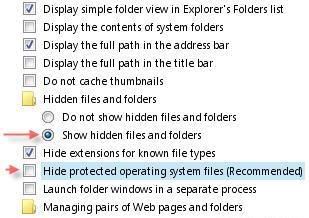
Tuesday, December 4, 2007
MACINTOSH

Macintosh, or for newer models, Mac, is a brand name which covers several lines of personal computers designed, developed, and marketed by Apple Inc. The original Macintosh was released on January 24, 1984; it was the first commercially successful personal computer to feature a mouse and a graphical user interface (GUI) rather than a command line interface. Current Mac systems are mainly targeted at the home, education, and creative professional markets. They range from the entry-level Mac mini and consumer-level iMac desktop models, the workstation-level Mac Pro tower, and the MacBook and MacBook Pro laptop computers.
Production of the Mac is based on a vertical integration model in that Apple facilitates all aspects of its hardware and creates its own operating system that is pre-installed on all Macs. Apple exclusively produces Mac hardware, choosing internal systems, designs, and prices. Apple does use third party components, however; current Macintosh CPUs use Intel's x86 architecture (formerly the AIM alliance's PowerPC and originally Motorola's 68k). Apple also designs the operating system for Macs, currently Mac OS X 10.5 "Leopard". This is in contrast to most IBM compatible PCs, where one vendor provides the operating system and multiple vendors create the hardware. The modern Mac, like other PCs, is capable of running operating systems such as Linux, FreeBSD, and Microsoft Windows, considered to be the Mac's biggest competitor.

Apple directly sub-contracts hardware production to Asian manufacturers, maintaining a high degree of control over the end product. By contrast, most other companies (including Microsoft) create software that can be run on a variety of third-party hardware. The current Mac product family uses Intel x86 processors. All Mac models ship with at least 1 GB RAM as standard. Current Mac computers use an ATI Radeon, nVidia GeForce or Intel GMA graphics cards and include either a Combo Drive, a DVD player and CD burner all-in-one; or the SuperDrive, a dual-function DVD and CD burner. Macs include two standard data transfer ports: USB and FireWire. USB was introduced in the 1998, iMac G3 and is ubiquitous today; FireWire is mainly reserved for high-performance devices such as hard drives or video cameras.
The majority of Mac computers have historically shipped with a single-button mouse, largely because surveys showed users (at the time) didn't know which button to use. Although Microsoft's IntelliMouse, featuring two buttons and a scroll wheel, was introduced in 1995 to great success, Macs did not support more than one mouse button until Mac OS X arrived in 2001. This changed in August 2005, when Apple released the four-button Mighty Mouse (a wireless version was made available on July 25, 2006) and began to ship it with new desktop Macs.

The original Macintosh was the first successful computer to use a graphical user interface devoid of a command line. Instead it used a desktop metaphor, depicting meatspace objects like documents and a trashcan as icons onscreen. The System Software, named Mac OS starting with version 7.6, continued to evolve until version 9.2.2. In 2001, Apple introduced Mac OS X, based on Darwin and NEXTSTEP; its new features included the Dock and the Aqua user interface. The most recent version is Mac OS X v10.5 "Leopard". In addition to Leopard, all new Macs are bundled with assorted Apple-produced applications, including iLife, a trial of iWork, the Safari web browser and the iTunes media player.
The Macintosh operating system enjoys a near-absence of the types of malware and spyware that affect Microsoft Windows users. This is due to both Mac OS X's UNIX roots and smaller user base. Both of these factors drive malware creators to develop for Windows. However, worms as well as potential vulnerabilities were noted in February 2006, which led some industry analysts and anti-virus companies to issue warnings that Apple's Mac OS X is not immune to viruses, as is commonly misconceived. Regardless, there has not been an outbreak of Mac malware, and Apple routinely issues security updates for its software.
Originally, the hardware architecture was so closely tied to Mac OS that it was impossible to boot an alternative operating system; the most common workaround, used even by Apple for A/UX, was to boot into Mac OS and then to give control to a boot loader program. This technique is not necessary on Open Firmware-based PCI Macs, though it was formerly used for convenience on many Old World ROM systems due to bugs in the firmware implementation. Now, Mac hardware boots directly from Open Firmware or EFI, and Macs are no longer limited to running just the Mac OS. Following the release of Intel-based Mac, third-party virtualization software such as Parallels Desktop, VMware Fusion, and Crossover Mac began to emerge, allowing users to run much of the previously Windows-only software on a Mac. Apple also released Boot Camp, which allows users to run Windows XP or Vista natively on any Intel-based Mac. Because Mac OS X is less common than Microsoft Windows, less third-party software is available, although popular applications such as Microsoft Office, are usually cross-platform and can run without emulation.

Macintosh’s user interface is far different from those of other personal computers. Strictly speaking, it is not all that new. The original concepts were pioneered at Xerox’s Palo Alto Research Center (PARC) several years ago. Apple used them heavily in the original Lisa machine, released a year before the Mac. The people who most needed the interface were those who could least afford it: small business people, students, etc. The Macintosh is still a bit expensive, but it’s within the reach of far more people than any of its predecessors.
The Macintosh is not without its problems. Resources are tight – it needs more memory and disk space – and software has been slow in coming to market. Many have criticized its price ($2495). In fact, there are indications that Apple considered a lower price ($1995) and then rejected it. It doesn’t seem to have hurt the Mac’s market – people are still buying them faster than Apple can make them – but there’s the potential for backlash if the machine doesn’t deliver on all its promises.
Whatever its problems and limitations, the Mac represents a breakthrough in adapting computers to work with people instead of vice versa.LINUX vs WINDOWS

OPEN SOURCE
The major difference between Linux and Windows is the open-source nature of Linux and closed-source nature of Windows. Linux, as an open-source OS, can be modified by the user as he/ she sees fit. Open source really means that anyone can modify the underlying code, and that no one completely owns it. Microsoft Windows, on the other hand, is not an operating system you can modify easily - it was designed to work a particular way with a certain user interface as designated by Microsoft software engineers.
The consequences of Linux being an open-source OS are many. Because you can modify the code, and because there are many user interfaces out there (GUIs), there are usually compatibility issues with various software applications. Some software may be designed to work with multiple Linux GUIs, while others many only be able to work with a few, or just one. Also, the open-source operating system demands that the user know how to work with and modify the program - a task that is usually very difficult for the average computer user familiar with Windows. Even the installation of Linux can be a chore if you are not familiar with Linux terminology.
COSTThe problem with moving to newer versions of Windows is primarily the cost. These operating systems will almost certainly require you to purchase new, more powerful hardware to run them, and new software licenses as well. Since the changes to the operating system are significant, the upgrade is actually more like a wholesale migration.
Given the likely cost and work involved in moving to a new Windows platform, it's certainly worth considering other options that may be available.
The most obvious alternative to consider is Linux. That's because it runs on the same hardware as Windows, and because it requires far less processing power, it's almost certain that existing Windows boxes will be able to run Linux without requiring costly hardware upgrades. And since Linux requires no client access licenses, there are no extra fees to pay as your organization expands
Many of these problems simply do not apply to Linux. It is arguable that Linux is an inherently more secure operating system than any of the Windows versions, but leaving that question to one side it is certainly true that there are far fewer Linux security vulnerabilities highlighted in a given period than there are for Windows.
More importantly, Linux is open source software, so security is achieved by transparency: Everyone can see and check the underlying code, and any vulnerabilities that do come to light can immediately be dealt with by the global open source software community as a whole. Patches are therefore typically produced in a matter of days—sometimes in just a few hours. And whereas viruses and worms that target Windows platforms abound on the Internet, malicious code of these sorts that affects Linux is rarely seen. Although patching Linux systems also has an impact on productivity, patching is less frequent, and Linux systems don not require reboots for patches to take effect (unless the Linux kernel itself is updated).
RELIABILITY
Reliability is also an important point to consider, and Linux is well-known for its stability. This stems from the architecture of the operating system as a whole. The Linux kernel was specifically designed to keep each application component, and the kernel itself, as isolated as possible so that in the event that a particular application terminates unexpectedly, it has no effect on other applications or the operating system as a whole. As a result, servers can be expected to run continuously for months or years rather than days, and reboots to restore performance to machines that have slowed after application crashes are almost unheard of.
This compares extremely favorably with Windows servers, which normally require booting frequently, either due to unexpected application terminations, or as a result of patches. Linux systems generally require rebooting only after a bad software download, or if a critical piece of hardware fails. And when a Linux system does crash badly, the Linux kernel can usually be rebooted from a floppy quickly with little loss of functionality. A Windows system, by contrast, will often have to be reinstalled from CD—usually with total loss of functionality.
PROPRIETARY vs OPEN SOURCE
A number of other benefits that stem from the open source nature of Linux. Whereas the Windows license covers the operating system only, most Linux distributions include a large library of extra tools, utilities and other software including the Apache Web server, MySQL database, Samba (for file and print services) and the GNU compiler. In the Windows world, you would have to purchase equivalent products separately. And since Linux source code is readily available, Linux applications can be customized or tailored either in-house or by consultants whenever required.
SUPPORT
Finally, a common misconception about Linux is that whereas Microsoft "owns" Windows and can therefore support it, organizations using open source software have nowhere to turn to for professional support. In fact, many organizations—from Linux distributors to independent companies—support Linux implementations, and, as mentioned earlier, the TCO of Linux ownership— including support, is lower than with Windows.
Linux may not be suitable for all organizations, and other, more costly options such as UNIX also exist. But any organization running Windows—especially Windows NT—would be wise to evaluate Linux before committing themselves to another round of Windows upgrades.
LINUX
Linux is a Unix-like computer operating system. Linux is one of the most prominent examples of free software and open source development; typically all underlying source code can be freely modified, used, and redistributed by anyone.
The Linux kernel was first released to the public on 17 September 1991, for the Intel x86 PC architecture. The kernel was augmented with system utilities and libraries from the GNU project to create a usable operating system, which led to an alternative term, GNU/Linux. Linux is packaged for different uses in Linux distributions, which contain the sometimes modified kernel along with a variety of other software packages tailored to different requirements.
Predominantly known for its use in servers, Linux is supported by corporations such as Dell, Hewlett-Packard, IBM, Novell, Oracle Corporation, Red Hat, and Sun Microsystems. It is used as an operating system for a wide variety of computer hardware, including desktop computers, supercomputers, video game systems, such as PlayStation 2, 3, several arcade games, and embedded devices, such as mobile phones and routers.
The primary difference between Linux and many other popular contemporary operating systems is that the Linux kernel and other components are free and open source software. Linux is not the only such operating system, although it is the best-known and most widely used. Some free and open source software licences are based on the principle of copyleft, a kind of reciprocity: any work derived from a copyleft piece of software must also be copyleft itself. The most common free software license, the GNU GPL, is used for the Linux kernel and many of the components from the GNU project.
As an operating system underdog competing with mainstream operating systems, Linux cannot rely on a monopoly advantage; in order for Linux to be convenient for users, Linux aims for interoperability with other operating systems and established computing standards. Linux systems adhere to POSIX, SUS, ISO, and ANSI standards where possible, although to date only one Linux distribution has been POSIX.1 certified, Linux-FT.
Programming on Linux
Most Linux distributions support dozens of programming languages. The most common collection of utilities for building both Linux applications and operating system programs is found within the GNU toolchain, which includes the GNU Compiler Collection (GCC) and the GNU build system. Amongst others, GCC provides compilers for C, C++, Java, Ada and Fortran. The Linux kernel itself is written to be compiled with GCC.
Most also include support for Perl, Ruby, Python and other dynamic languages. Examples of languages that are less common, but still well-supported, are C# via the Mono project, and Scheme. A number of Java Virtual Machines and development kits run on Linux, including the original Sun Microsystems JVM (HotSpot), and IBM's J2SE RE, as well as many open-source projects like Kaffe. The two main frameworks for developing graphical applications are those of GNOME and KDE. These projects are based on the GTK+ and Qt widget toolkits, respectively, which can also be used independently of the larger framework. Both support a wide variety of languages. There are a number of Integrated development environments available including Anjuta, Code::Blocks, Eclipse, KDevelop, MonoDevelop, NetBeans, and Omnis Studio while the traditional editors Vim and Emacs remain popular.
Although free and open source compilers and tools are widely used under Linux, there are also proprietary solutions available from a range of companies, including the Intel C++ Compiler, PathScale, Micro Focus COBOL, Franz Inc and the Portland Group.
User interface
Linux is coupled to a text-based command line interface (CLI), though this is usually hidden on desktop computers by a graphical user interface (GUI). On small devices, input may be handled through controls on the device itself, and direct input to Linux might be hidden entirely.
The X Window System (X) is the predominant graphical subsystem used in Linux. X provides network transparency, enabling graphical output to be displayed on machines other than that which a program runs on. For desktop machines X runs locally.
Early GUIs for Linux were based on a stand-alone X window manager such as FVWM, Enlightenment, or Window Maker, and a suite of diverse applications running under it. The window manager provides a means to control the placement and appearance of individual application windows, and interacts with the X window system. Because the X window managers only manage the placement of windows, their decoration, and some inter-process communication, the look and feel of individual applications may vary widely, especially if they use different graphical user interface toolkits.
This model contrasts with that of platforms such as Mac OS, where a single toolkit provides support for GUI widgets and window decorations, manages window placement, and otherwise provides a consistent look and feel to the user. For this reason, the use of window managers by themselves declined with the rise of Linux desktop environments. They combine a window manager with a suite of standard applications that adhere to human interface guidelines. While a window manager is analogous to the Aqua user interface for Mac OS X, a desktop environment is analogous to Aqua with all of the default Mac OS X graphical applications and configuration utilities. KDE, which was announced in 1996, along with GNOME and Xfce which were both announced in 1997, are the most popular desktop environments.
TOP LINUX DISTRIBUTIONS :
1. Red Hat
2. SuSE
3. Mandriva
4. Fedora
5. Debian
6. Gentoo
7. Knoppix
8. Ubuntu
9. Subuntu
10. Lycoris
11. Yellow Dog
12. Slackware